> ## Documentation Index
> Fetch the complete documentation index at: https://guidenl.chatwize.ai/llms.txt
> Use this file to discover all available pages before exploring further.
# Collecting data
> Capture names, email addresses and your own fields, and forward them.
Chatwize can collect information from conversations and forward it. You set this
up under **Settings**, in the **Collecting data** group.
## Where to find it
From **Chatbots**, click the chatbot you want to work on.
In the left sidebar, under **Manage**, click **Settings**.
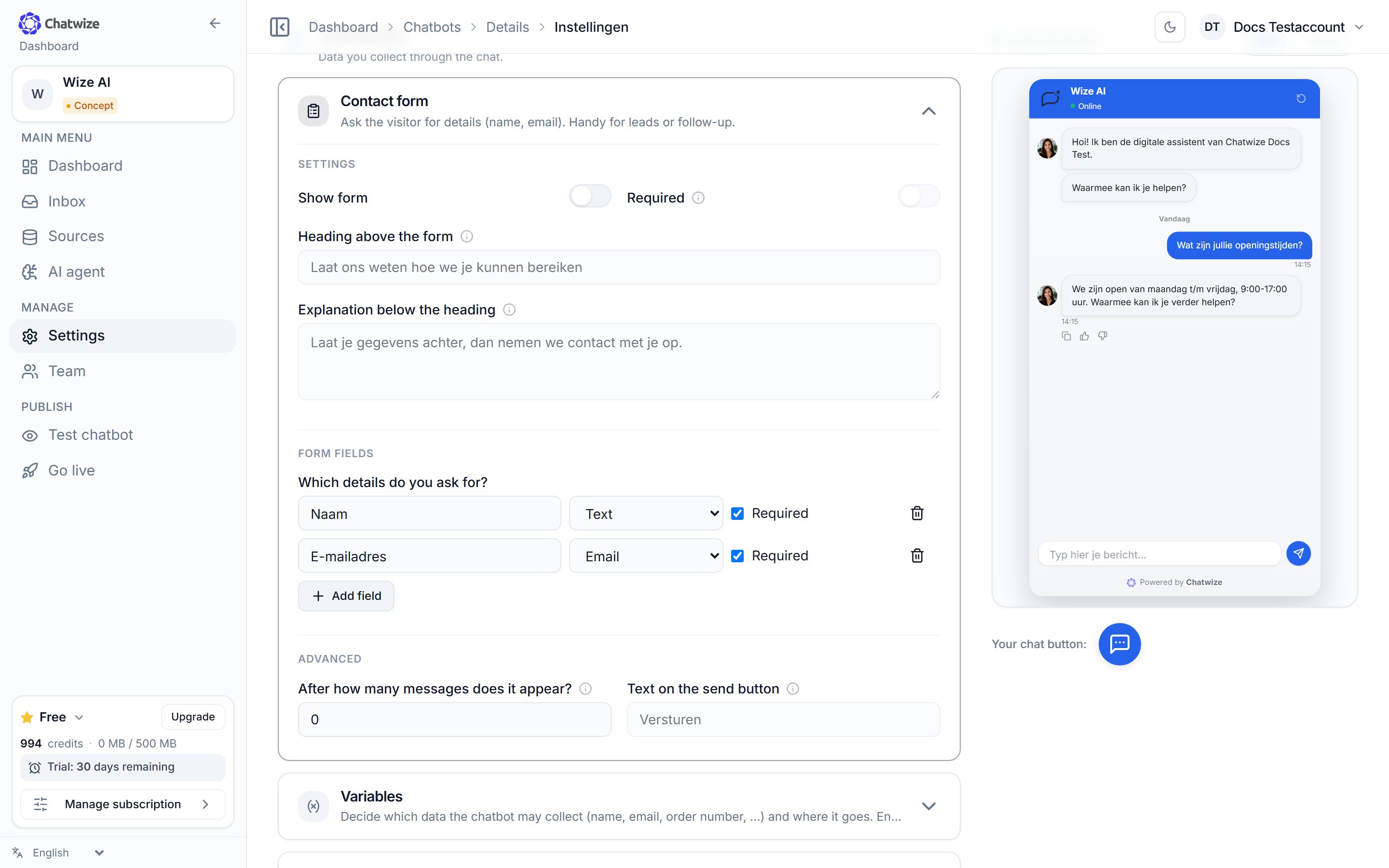
Click **Contact form**, **Variables** or **Satisfaction / feedback** to
expand it.
 ## Three sections
Ask the visitor for details (name, email) with a form in the chat. You decide
the fields, whether they're required, and after how many messages it appears.
Decide which data the chatbot may collect (name, email, order number, …) and
where it goes.
Put thumbs under the AI's answers, with an optional comment from the visitor.
### Letting variables fill themselves
Per variable you can turn on that the assistant **recognises it itself** in the
conversation. If a visitor simply mentions their email address in a sentence,
it's captured without you having to show a form.
## Where the data goes
Everything collected sits in **Inbox → Data**, with a link back to the
conversation it came from. Form submissions and variables are shown together,
with a label showing where each entry came from. From that page you export
everything to CSV.
Automatic forwarding is set in the **Forwarding & integrations** group:
* **Email notifications** — a message to your own inbox.
* **Webhook** — data to your CRM, spreadsheet or automation tool.
See [Integrations](/en/integrations) for how to set those up.
Per channel you choose which fields are included. Tick one field and it's sent as
soon as that arrives; tick several and Chatwize waits until they're all there.
That choice applies to all webhooks together.
Collected data comes from what a visitor types. Treat it as untrusted input:
check it before you use it in your CRM, an invoice or a spreadsheet.
## Three sections
Ask the visitor for details (name, email) with a form in the chat. You decide
the fields, whether they're required, and after how many messages it appears.
Decide which data the chatbot may collect (name, email, order number, …) and
where it goes.
Put thumbs under the AI's answers, with an optional comment from the visitor.
### Letting variables fill themselves
Per variable you can turn on that the assistant **recognises it itself** in the
conversation. If a visitor simply mentions their email address in a sentence,
it's captured without you having to show a form.
## Where the data goes
Everything collected sits in **Inbox → Data**, with a link back to the
conversation it came from. Form submissions and variables are shown together,
with a label showing where each entry came from. From that page you export
everything to CSV.
Automatic forwarding is set in the **Forwarding & integrations** group:
* **Email notifications** — a message to your own inbox.
* **Webhook** — data to your CRM, spreadsheet or automation tool.
See [Integrations](/en/integrations) for how to set those up.
Per channel you choose which fields are included. Tick one field and it's sent as
soon as that arrives; tick several and Chatwize waits until they're all there.
That choice applies to all webhooks together.
Collected data comes from what a visitor types. Treat it as untrusted input:
check it before you use it in your CRM, an invoice or a spreadsheet.